Being wrong in writing
Partway through my INFT4000 semester project, I concluded — confidently, in a graded assignment — that my GPU had hit a hard architectural ceiling. Running the Einstein@Home gravitational-wave search on Windows, pushing past two concurrent tasks made completion times balloon instead of throughput rising. I wrote that even perfectly separable work units are ultimately capped by the silicon: the memory controllers and cache bandwidth act as the ceiling for efficiency.
It was a plausible explanation. It was also wrong, and the rest of the semester was about finding out why.
Some context if you don’t live in this world: Einstein@Home is a volunteer computing project that crunches LIGO detector data on donated hardware, searching for continuous gravitational waves from spinning neutron stars. The O4 all-sky search hands out “embarrassingly parallel” work units — each one applies matched filtering over an independent slice of data, so the only limits on local concurrency are your hardware and whatever software is scheduling the work. The score that matters is RAC, Recent Average Credit: a rolling measure of daily throughput. My single node — a liquid-cooled RTX 5090 that should have been near the top of the volunteer leaderboards — was producing a fraction of what the hardware implied.
The message that broke the model
While digging through the leaderboards for setups comparable to mine, I kept landing on one: a Finnish volunteer, Petri33, sitting at roughly 9.5 million RAC on similar hardware — nearly four times my Windows output. So I sent him a private message and asked what I was missing.
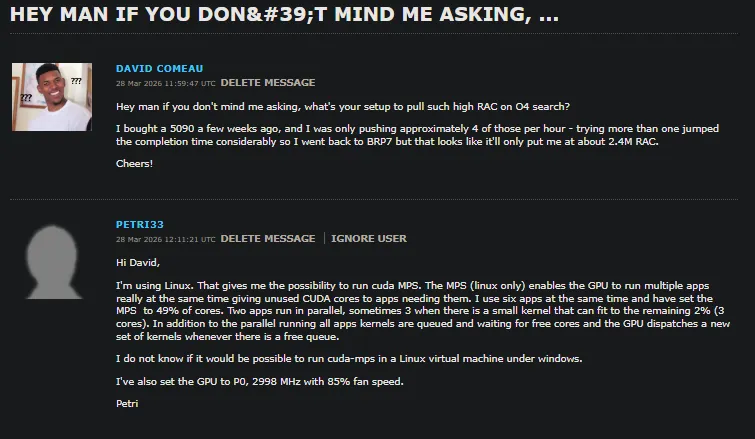 Figure 1 — The message that reframed the whole project. Nothing in it is about hardware.
His answer didn’t mention the GPU once. Linux, because it makes CUDA MPS possible. MPS capped at 49% of cores per task. Six tasks loaded in BOINC — two running in genuine parallel, the rest queued with kernels staged for immediate dispatch. Clocks locked to P0 at 2998 MHz. Same class of silicon as mine; an entirely different software stack underneath it.
Why Windows was the actual bottleneck
On Windows, NVIDIA GPUs operate under WDDM — the Windows Display Driver Model. WDDM was designed for desktop compositing, and everything that touches the GPU goes through it: the desktop window manager, your browser, video playback, and your CUDA compute tasks, all in the same scheduling queue. When multiple CUDA processes run at once, WDDM time-slices between them, granting each one exclusive-but-temporary access. The processes never share the hardware. They take turns.
That’s why my earlier testing fell apart past two concurrent tasks. Every additional CUDA context added scheduling overhead and forced the GPU to repeatedly flush and reload state between turns. The tasks weren’t contending for compute — they were contending for the driver’s attention. The tell, in hindsight, was how absurdly sensitive the whole thing was to unrelated GPU activity: watching a YouTube video added 10–15 seconds to each task’s completion time, because the browser’s hardware-accelerated compositor was forcing extra context switches.
CUDA MPS — Multi-Process Service — is the Linux-only runtime that removes the turn-taking. Instead of each process owning an isolated context, a dedicated MPS server process holds one shared context, and every client submits kernels through it. The GPU’s own hardware scheduler then dispatches those kernels across Streaming Multiprocessors simultaneously. The key tunable is CUDA_MPS_ACTIVE_THREAD_PERCENTAGE: set to 49, each client can occupy up to 49% of the SMs, so two active tasks cover ~98% of the chip while a third occasionally squeezes small kernels into the remaining 2%. Queued tasks keep their kernels staged so the GPU never idles between completions.
The part that still impresses me: it’s completely transparent. BOINC and the Einstein@Home binaries needed zero modification. The parallelism lives entirely at the driver level.
The build
The hardware, for reference: a Ryzen 9 9950X3D, an ASUS ROG Astral RTX 5090 LC OC (32 GB GDDR7), and 64 GB of DDR5-6000 on an X670E Taichi Carrara — a machine that goes by Woodsmoke, as the screenshots will give away.
Dual-boot without the time travel
I installed Linux Mint 22 Cinnamon alongside Windows 11 Pro. One classic dual-boot trap worth flagging: Windows assumes the hardware clock stores local time, Linux assumes UTC, and without correction your clock jumps by your timezone offset every time you switch. The fix on the Windows side is one registry value:
reg add "HKLM\SYSTEM\CurrentControlSet\Control\TimeZoneInformation" /v RealTimeIsUniversal /t REG_DWORD /d 1 /fThat tells Windows to treat the hardware clock as UTC, matching Linux’s default.
Drivers for Blackwell
The RTX 5090’s Blackwell architecture requires NVIDIA’s open kernel modules — the fully proprietary driver doesn’t recognize the GPU at all and fails with No devices were found. After booting on nouveau, I added the graphics-drivers PPA and selected nvidia-driver-590-open (590.48.01) in Mint’s Driver Manager, which brought the full CUDA 13.1 driver stack with it. The nvidia-cuda-toolkit package then provides nvidia-cuda-mps-control, the binary that runs the show.
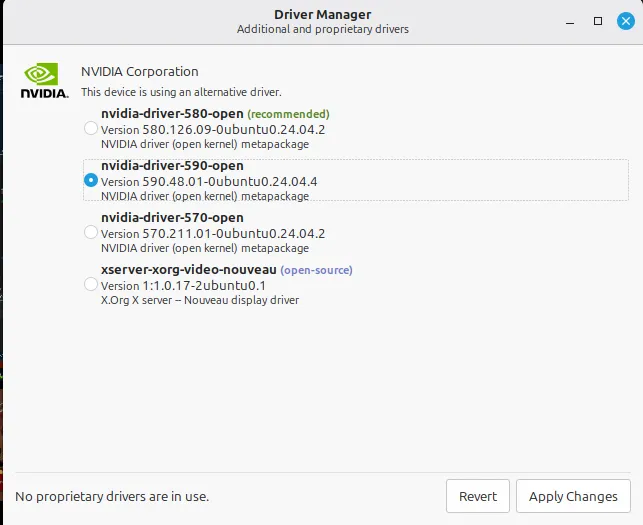 Figure 2 — Driver Manager after adding the PPA. For Blackwell, “open” isn’t a preference, it’s a requirement.
MPS as a systemd service
MPS runs as a daemon, and I wanted it surviving reboots without ritual, so it became a systemd unit. This also bakes in persistence mode (nvidia-smi -pm 1), which keeps the driver loaded between compute sessions and kills the cold-start initialization delay:
# /etc/systemd/system/nvidia-mps.service
[Unit]
Description=NVIDIA CUDA MPS Control Daemon
After=multi-user.target

[Service]
Type=forking
Environment="CUDA_MPS_ACTIVE_THREAD_PERCENTAGE=49"
Environment="CUDA_MPS_PIPE_DIRECTORY=/tmp/nvidia-mps"
Environment="CUDA_MPS_LOG_DIRECTORY=/var/log/nvidia-mps"
ExecStartPre=/usr/bin/nvidia-smi -pm 1
ExecStart=/usr/bin/nvidia-cuda-mps-control -d
ExecStop=/bin/bash -c "echo quit | /usr/bin/nvidia-cuda-mps-control"
Restart=on-failure
RestartSec=5

[Install]
WantedBy=multi-user.target
Enable it, then ask the daemon what it thinks its thread cap is:
sudo systemctl enable --now nvidia-mps.service
echo get_default_active_thread_percentage | nvidia-cuda-mps-control
# 49.0
Locking the clocks
Petri33 locks his GPU to the P0 performance state at 2998 MHz, which stops the card from downclocking between kernel dispatches — lower latency, steadier throughput. That became a second, oneshot unit:
# /etc/systemd/system/nvidia-gpu-config.service
[Unit]
Description=NVIDIA GPU Clock and Power Configuration
After=nvidia-mps.service

[Service]
Type=oneshot
RemainAfterExit=yes
ExecStart=/usr/bin/nvidia-smi -pm 1
ExecStart=/usr/bin/nvidia-smi -lgc 2998,2998

[Install]
WantedBy=multi-user.target
One gotcha cost me an evening: my first version depended on nvidia-persistenced.service, which doesn’t exist in this configuration, so the unit silently failed to start. Re-pointing the dependency at nvidia-mps.service fixed it. Systemd dependency debugging: a skill acquired the traditional way.
Telling BOINC the truth about the GPU
On Linux, the O4 all-sky application registers under a different name than on Windows — einstein_O4AS, which I found by inspecting the job log. With that name, an app_config.xml in the project directory tells the BOINC scheduler to treat each task as needing half a GPU:
<!-- /var/lib/boinc-client/projects/einstein.phys.uwm.edu/app_config.xml -->
<app_config>
  <app>
    <name>einstein_O4AS</name>
    <gpu_versions>
      <gpu_usage>0.50</gpu_usage>
      <cpu_usage>1.0</cpu_usage>
    </gpu_versions>
  </app>
</app_config>
gpu_usage at 0.50 means two concurrent tasks — aligned with the 49% per-client cap on the MPS side.
Verification
With everything in place, nvidia-smi shows the nvidia-cuda-mps-server process brokering two concurrent gw-linux-gpu compute tasks, GPU utilization holding near 100%, performance state P0, no thermal or power throttling. BOINC Manager agrees: two O4 tasks, each reporting Running (1 CPU + 0.5 NVIDIA GPUs).
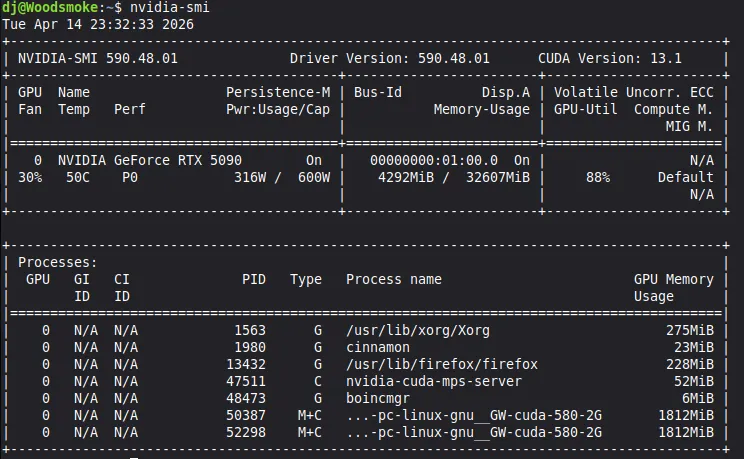 Figure 3 — The MPS server brokering two compute clients on one GPU. This is the screenshot the whole project was for.
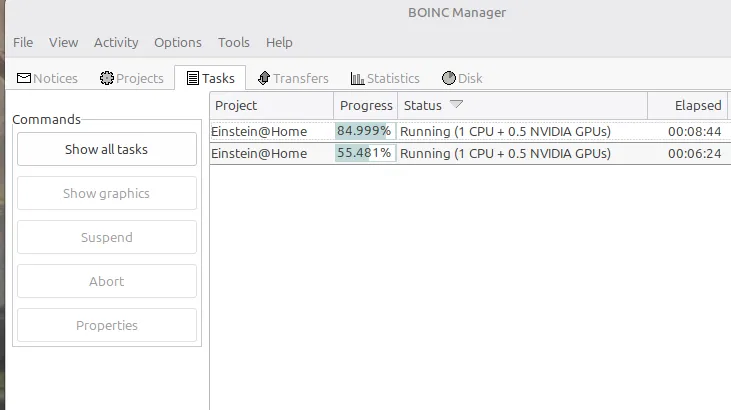 Figure 4 — BOINC’s view of the same thing: two tasks, genuinely in parallel.
The numbers
The before/after, across both the older BRP7 work units and the O4 search this was all aimed at:
| Configuration | Concurrent tasks | Avg. time / task | Credit / task | Credit / sec | Est. daily RAC |
|---|---|---|---|---|---|
| Windows — 1 task (BRP7) | 1 | ~2:00 | 3,333 | 27.8 | ~2.4M |
| Windows — 2 tasks (BRP7) | 2 | ~3:50 | 3,333 | 28.9 | ~2.5M |
| Windows — 1 task (O4) | 1 | ~15:00 | 18,000 | 20.0 | ~1.7M |
| Windows — 2 tasks (O4) | 2 | ~20:00 | 18,000 | 30.0 | ~2.6M |
| Linux + MPS (O4) | 2 | ~8:25 | 18,000 | 71.3 | ~6.2M |
| Petri33 (reference) | 6 queued / 2 parallel | ~12:55 | 18,000 | ~110 | ~9.5M |
The headline number isn’t the RAC — it’s the per-task time. Two O4 tasks running in parallel under MPS each finish in about 8 minutes 25 seconds. A single task on Windows took fifteen. The Linux box completes each task faster than Windows could finish one alone, while doing twice the work at once. Effective throughput went from 20.0 to 71.3 credit per second on identical hardware: a 3.5× improvement that conclusively kills my earlier conclusion. The ceiling was never the memory controllers. It was the scheduling model.
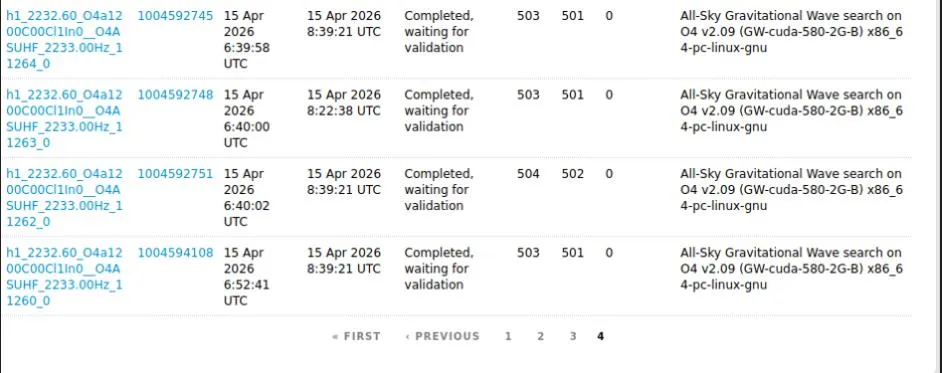 Figure 5 — A completed batch. Two tasks landing roughly every eight and a half minutes, around the clock.
Two findings from testing worth keeping:
Browsers tax the GPU even on Linux. Firefox’s hardware-accelerated compositor consumed VRAM and forced context switches, dropping GPU utilization from ~100% to ~73% and visibly slowing tasks. Disabling hardware acceleration — or closing the browser — restored full throughput. Any GPU consumer competes with compute, not just other CUDA work.
The remaining gap to 9.5M is queue depth, not speed. Petri33 keeps six tasks loaded so the MPS dispatch pipeline never starves; my testing ran two. Per task I’m actually faster — ~505 seconds against his ~775, likely the 9950X3D’s single-thread advantage on the CPU-bound portions of O4 — which suggests a deeper queue at my per-task times could plausibly match or pass his throughput. That’s the next experiment.
What actually transferred
The technical lesson is about layers: a plausible explanation at one layer can completely mask the true cause at another. No profiler flags “your operating system’s display driver model” as the bottleneck. Diagnosing it meant walking the whole stack — application, driver, hardware — instead of stopping at the first story that fit the data.
The practical one is that this project quietly turned into a Linux systems administration course: writing systemd units, managing environment variables for daemons, debugging dependency failures, running GPU drivers from a PPA. Before this, my Linux experience was casual desktop use. Now there’s a workstation in my office running persistent compute services that survive reboots without me thinking about them.
But the lesson I’d actually put first: months of solo research, documentation reading, and experimentation never surfaced CUDA MPS as the answer. One direct message to the person who had already solved the problem did — and he answered a student’s question generously and precisely. In a course built entirely around independent learning, the highest-leverage move turned out to be asking for help, and crediting it.
Thanks, Petri.